# Write a plan policy
A rule is a shape that the plan document has to fit, in the CUE you already know. Read the document, write rules in the policy studio of the viewer, where each is held against the plans you saved and against the resources of the state as you type, keep them as files for the pipeline, and put one in force.
Level: intermediate · Time: 25 minutes · Needs: B11 and C3
You will learn: What does a rule read? How do you say "every change of this type" and "at least this much"? How do you try a rule on a plan, or on the whole estate, without applying anything?
Done when: A rule you wrote refuses a plan file in the policy studio and under pravo policy test with exit code 5, and a plan against the state is refused by the policy in force.
B11 wrote one policy: a list template with a guard and `error()`, and the plan that deleted a resource was refused. This lesson is about writing rules. In the OpenTofu world a rule on a plan is a program in another language, run by another tool over the JSON of the plan, and the team that writes infrastructure learns a second language to guard it. In pravo a rule is a CUE value, and the plan has to unify with it. The language of the rule is the language of the specification, and a rule is read the way A3 read two declarations of one field: it holds when the two agree.
:::compare
```text title="a rule as a program"
deny[msg] {
some i
input.resource_changes[i].change.actions[_] == "delete"
msg := "no deletes"
}
```
```cue title="a rule as a shape"
summary: destroy: 0
```
:::
This lesson reads the document a rule sees, then writes three rules, each a little more specific, in the policy studio of the viewer, where a rule is held against the plans you saved and against the resources of the state as you type. Each rule is a file as well, which `pravo policy test` holds against plan files in a pipeline, with the same verdict. Nothing is applied or stored until the last section puts one rule in force.
## The document a rule reads
Work in an empty directory: it is the root, with a name and a password, and its state is sealed to Ada as C3 did it, in a local directory, because a policy in force is a signed version in the state. The setup runs the steps of C3 for you. The rules on trial live in `rules/`, inside the root.
```cue file=main.cue title="main.cue"
package team
import rnd "pravo.dev/providers/hashicorp/random"
$random: rnd.#Provider & {$version: "~> 3.6"}
pet: $random.#Resource.random_pet & {length: 2}
secret: $random.#Resource.random_password & {length: 16}
```
```sh run hidden
mkdir -p .pravo/access rules
pravo id new --name ada | grep '^ ada ssh' | sed 's/^ //' > .pravo/access/readers.txt
pravo init > /dev/null
pravo protect init --encrypt --yes --allow-local > /dev/null
pravo apply --auto-approve > /dev/null
```
A rule sees the plan document: the JSON that `pravo plan --json` prints, with the fields that only the state or the clock could give left out. Make the password longer and save the plan, and read the parts of the document that rules read most:
```sh run
sed -i 's/length: 16/length: 20/' main.cue
pravo plan --out longer.plan --json 2> /dev/null | jq -c '{summary: (.summary | {add, change, destroy}), changes: [.changes[] | {addr, type, action, after: {length: .after.length}}]}'
```
```text out
{"summary":{"add":1,"change":0,"destroy":1},"changes":[{"addr":"secret","type":"random_password","action":"replace","after":{"length":20}}]}
```
`summary` counts what the plan does. `changes` is a list with one entry per resource the plan touches: its address, its type, its action and its values after the change, and before it where there was a before. A password cannot be made longer in place, so the action is `replace`, and a replacement counts once as an addition and once as a destruction. [The plan document in a policy](../reference/policies-plan-document.md) lists every field and when each is present.
## Open the studio
The policy studio is the second page of the Policies section of the viewer: an editor on the left, and on the right the verdict of its text against a plan, or against every resource of the state, as you type. Start the viewer from the root in a second terminal and leave it running:
```sh
pravo serve
```
Open the address it prints and press `s`. The editor starts from a blank policy, in the form the specification declares one: the import of the `pravo` package, and a `pravo.#Policy` with a description and a rule. At the right, a switch reads Resources, with their count, and Plans, with the count of the plan files in the root and of the plans stored in the state; `longer.plan` is already there. Nothing the studio does is applied or stored. The rule runs in a scratch evaluator, and the state and the policies in force stay as they were.
## A rule is a shape
The smallest rule is one field with one value. Replace the draft in the editor with this policy, turn the switch to Plans, and pick `longer.plan` under Look at.
```cue file=rules/no_destroy.cue title="rules/no_destroy.cue"
import "pravo.dev/pravo"
no_destroy: pravo.#Policy & {
description: "A plan may create and change. It may not destroy."
rule: summary: destroy: 0
}
```
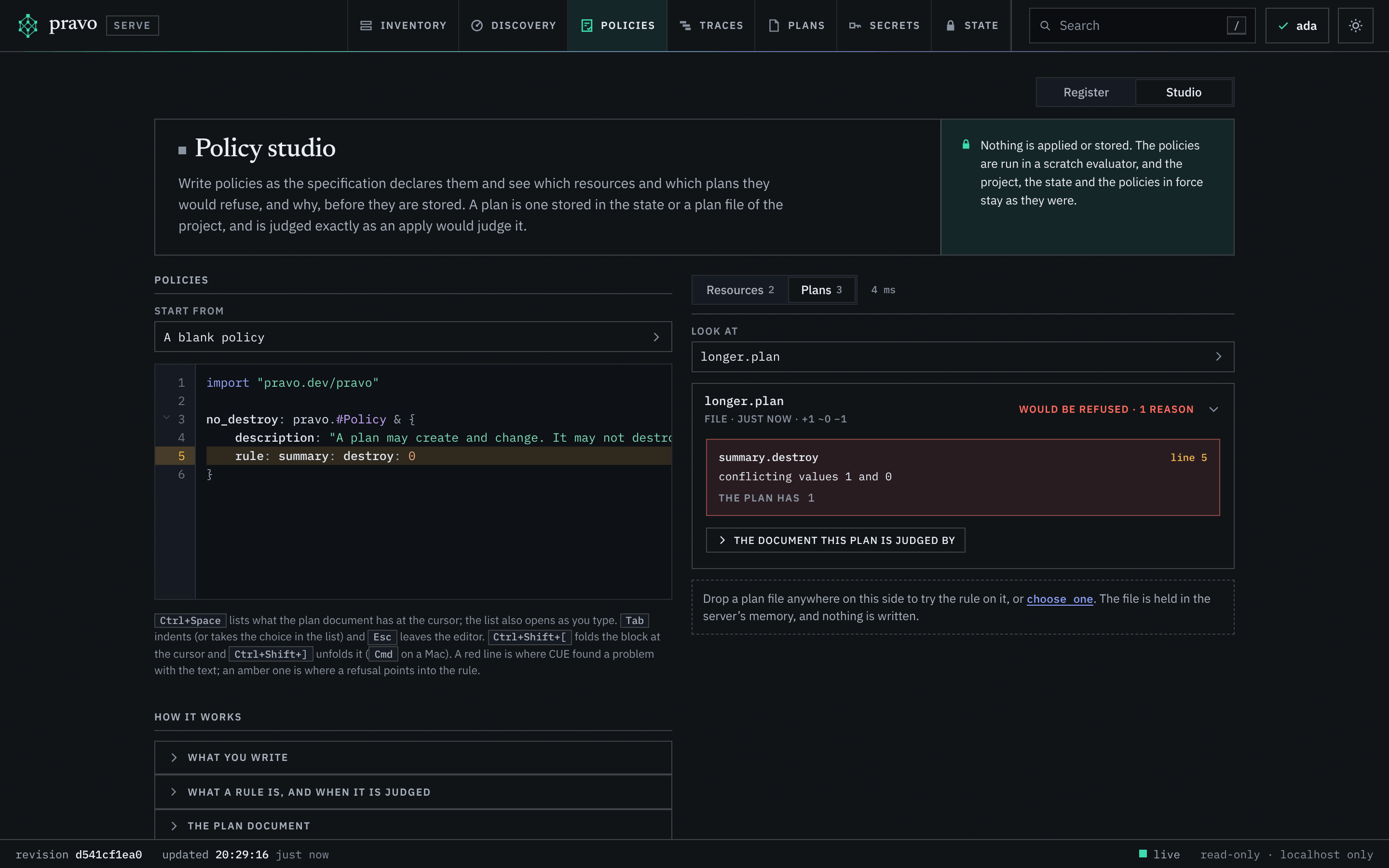
:::figure The studio with `no_destroy` held against `longer.plan`: the plan would be refused, with the path, the two values and the line of the rule.
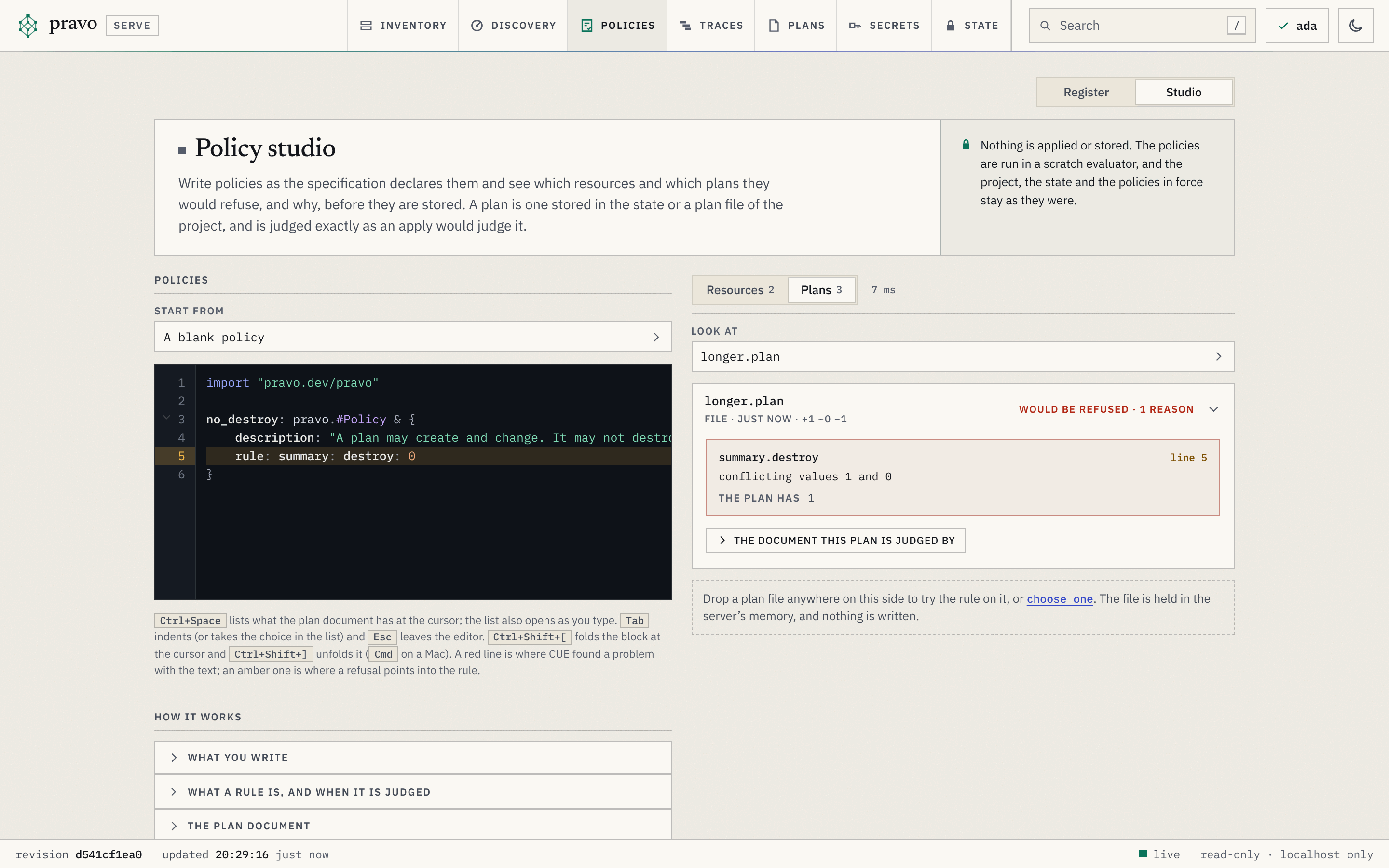 :::
The plan's `summary.destroy` is 1 and the rule's is 0. Two values for one field, and they do not agree: that is the error of A3, read the same way, with the path first, and the line of the rule that the refusal points into is marked in amber. The same text is the file `rules/no_destroy.cue`. `pravo policy test` holds a file against plan files and gives the verdict in a terminal, and exit code 5 says that a plan would be refused, so a pipeline can gate a draft rule on the plans the team has.
```sh run exit=5
pravo policy test rules/no_destroy.cue --plan longer.plan
```
```text out
Policy no_destroy (rules/no_destroy.cue: no_destroy)
✗ longer.plan file would be refused
no_destroy: summary.destroy: conflicting values 1 and 0
the plan has 1
0 of 1 judged plan hold.
Error: 1 plan would be refused
```
A plan that creates and destroys nothing fits the rule. Put the length back, add a name and save that plan. In the studio, `add.plan` joins the list under Look at, and the rule holds for it.
```cue file=main.cue title="main.cue" hl="9"
package team
import rnd "pravo.dev/providers/hashicorp/random"
$random: rnd.#Provider & {$version: "~> 3.6"}
pet: $random.#Resource.random_pet & {length: 2}
secret: $random.#Resource.random_password & {length: 16}
second: $random.#Resource.random_pet & {length: 2, prefix: "db"}
```
```sh run exit=5
pravo plan --out add.plan > /dev/null
pravo policy test rules/no_destroy.cue --plan add.plan --plan longer.plan
```
```text out
Policy no_destroy (rules/no_destroy.cue: no_destroy)
✓ add.plan file holds
✗ longer.plan file would be refused
no_destroy: summary.destroy: conflicting values 1 and 0
the plan has 1
1 of 2 judged plans hold.
Error: 1 plan would be refused
```
A rule says nothing about what it does not mention. `summary: destroy: 0` has no opinion on how many resources are added, on their types or on their values, and a plan that adds fifty passwords of one character fits it.
## A rule over every change
A rule about values is a rule about each entry of `changes`. A9 wrote one rule for every entry of a struct; `[...X]` is the same for a list: every element has to fit `X`. Inside it, an `if` from A12 picks the changes the rule is about, and a bound from A5 says how much is enough. Type it into the editor, and look at `add.plan`.
```cue file=rules/long_passwords.cue title="rules/long_passwords.cue"
import "pravo.dev/pravo"
long_passwords: pravo.#Policy & {
description: "A password has at least sixteen characters."
rule: changes: [...{
type: string
if type == "random_password" {
after?: length: >=16
}
}]
}
```
`type: string` declares the field the guard reads. A template is its own scope, so a field has to be named there before a condition can read it. The condition adds the constraint on `after.length` to the changes of that type and to no other. The question mark in `after?` is A7's optional field: a change that has an `after`, which a creation, an update and a replacement do, has to fit the constraint, and a deletion, which has no `after`, is left alone. Without it the rule would ask a deletion for a length it cannot have, and refuse every destroy.
:::predict `add.plan` creates a pet and touches no password. What does the rule say about it?
Ask what the template adds to a change whose type is not `random_password`.
::reveal
Nothing. The guard is not taken, so the change only has to be a struct with a `type` that is a string, which every change is. The plan holds.
:::
Make the password shorter and save that plan. The block carries `status=unintended`: the specification is valid, and the plan breaks the rule.
```cue file=main.cue title="main.cue" status=unintended hl="8"
package team
import rnd "pravo.dev/providers/hashicorp/random"
$random: rnd.#Provider & {$version: "~> 3.6"}
pet: $random.#Resource.random_pet & {length: 2}
secret: $random.#Resource.random_password & {length: 12}
second: $random.#Resource.random_pet & {length: 2, prefix: "db"}
```
```sh run
pravo plan --out short.plan > /dev/null
```
Pick `short.plan` under Look at:
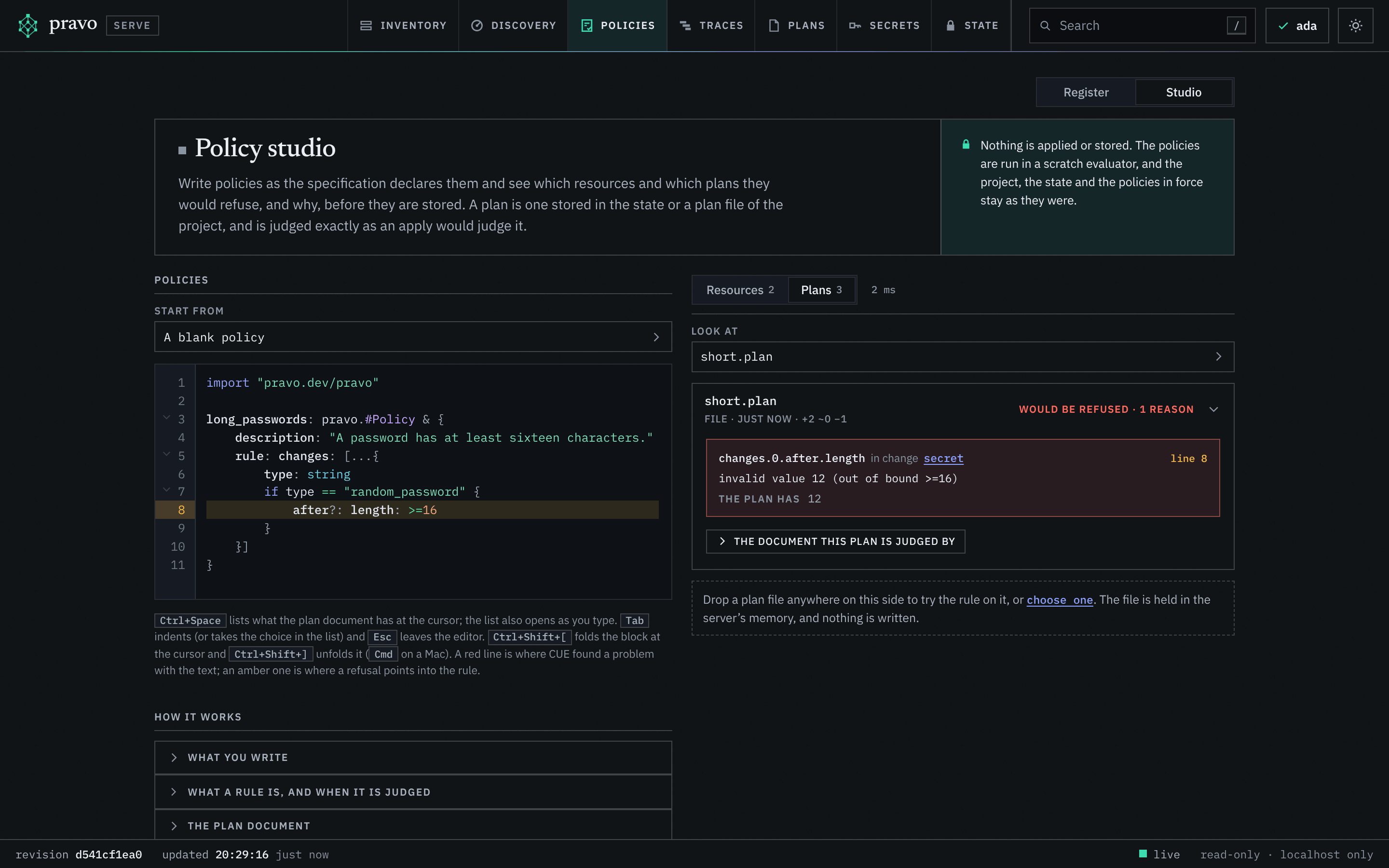
:::figure `long_passwords` held against `short.plan`: the change of `secret` fails the bound, and the line of the bound is marked.
:::
The plan's `summary.destroy` is 1 and the rule's is 0. Two values for one field, and they do not agree: that is the error of A3, read the same way, with the path first, and the line of the rule that the refusal points into is marked in amber. The same text is the file `rules/no_destroy.cue`. `pravo policy test` holds a file against plan files and gives the verdict in a terminal, and exit code 5 says that a plan would be refused, so a pipeline can gate a draft rule on the plans the team has.
```sh run exit=5
pravo policy test rules/no_destroy.cue --plan longer.plan
```
```text out
Policy no_destroy (rules/no_destroy.cue: no_destroy)
✗ longer.plan file would be refused
no_destroy: summary.destroy: conflicting values 1 and 0
the plan has 1
0 of 1 judged plan hold.
Error: 1 plan would be refused
```
A plan that creates and destroys nothing fits the rule. Put the length back, add a name and save that plan. In the studio, `add.plan` joins the list under Look at, and the rule holds for it.
```cue file=main.cue title="main.cue" hl="9"
package team
import rnd "pravo.dev/providers/hashicorp/random"
$random: rnd.#Provider & {$version: "~> 3.6"}
pet: $random.#Resource.random_pet & {length: 2}
secret: $random.#Resource.random_password & {length: 16}
second: $random.#Resource.random_pet & {length: 2, prefix: "db"}
```
```sh run exit=5
pravo plan --out add.plan > /dev/null
pravo policy test rules/no_destroy.cue --plan add.plan --plan longer.plan
```
```text out
Policy no_destroy (rules/no_destroy.cue: no_destroy)
✓ add.plan file holds
✗ longer.plan file would be refused
no_destroy: summary.destroy: conflicting values 1 and 0
the plan has 1
1 of 2 judged plans hold.
Error: 1 plan would be refused
```
A rule says nothing about what it does not mention. `summary: destroy: 0` has no opinion on how many resources are added, on their types or on their values, and a plan that adds fifty passwords of one character fits it.
## A rule over every change
A rule about values is a rule about each entry of `changes`. A9 wrote one rule for every entry of a struct; `[...X]` is the same for a list: every element has to fit `X`. Inside it, an `if` from A12 picks the changes the rule is about, and a bound from A5 says how much is enough. Type it into the editor, and look at `add.plan`.
```cue file=rules/long_passwords.cue title="rules/long_passwords.cue"
import "pravo.dev/pravo"
long_passwords: pravo.#Policy & {
description: "A password has at least sixteen characters."
rule: changes: [...{
type: string
if type == "random_password" {
after?: length: >=16
}
}]
}
```
`type: string` declares the field the guard reads. A template is its own scope, so a field has to be named there before a condition can read it. The condition adds the constraint on `after.length` to the changes of that type and to no other. The question mark in `after?` is A7's optional field: a change that has an `after`, which a creation, an update and a replacement do, has to fit the constraint, and a deletion, which has no `after`, is left alone. Without it the rule would ask a deletion for a length it cannot have, and refuse every destroy.
:::predict `add.plan` creates a pet and touches no password. What does the rule say about it?
Ask what the template adds to a change whose type is not `random_password`.
::reveal
Nothing. The guard is not taken, so the change only has to be a struct with a `type` that is a string, which every change is. The plan holds.
:::
Make the password shorter and save that plan. The block carries `status=unintended`: the specification is valid, and the plan breaks the rule.
```cue file=main.cue title="main.cue" status=unintended hl="8"
package team
import rnd "pravo.dev/providers/hashicorp/random"
$random: rnd.#Provider & {$version: "~> 3.6"}
pet: $random.#Resource.random_pet & {length: 2}
secret: $random.#Resource.random_password & {length: 12}
second: $random.#Resource.random_pet & {length: 2, prefix: "db"}
```
```sh run
pravo plan --out short.plan > /dev/null
```
Pick `short.plan` under Look at:
:::figure `long_passwords` held against `short.plan`: the change of `secret` fails the bound, and the line of the bound is marked.
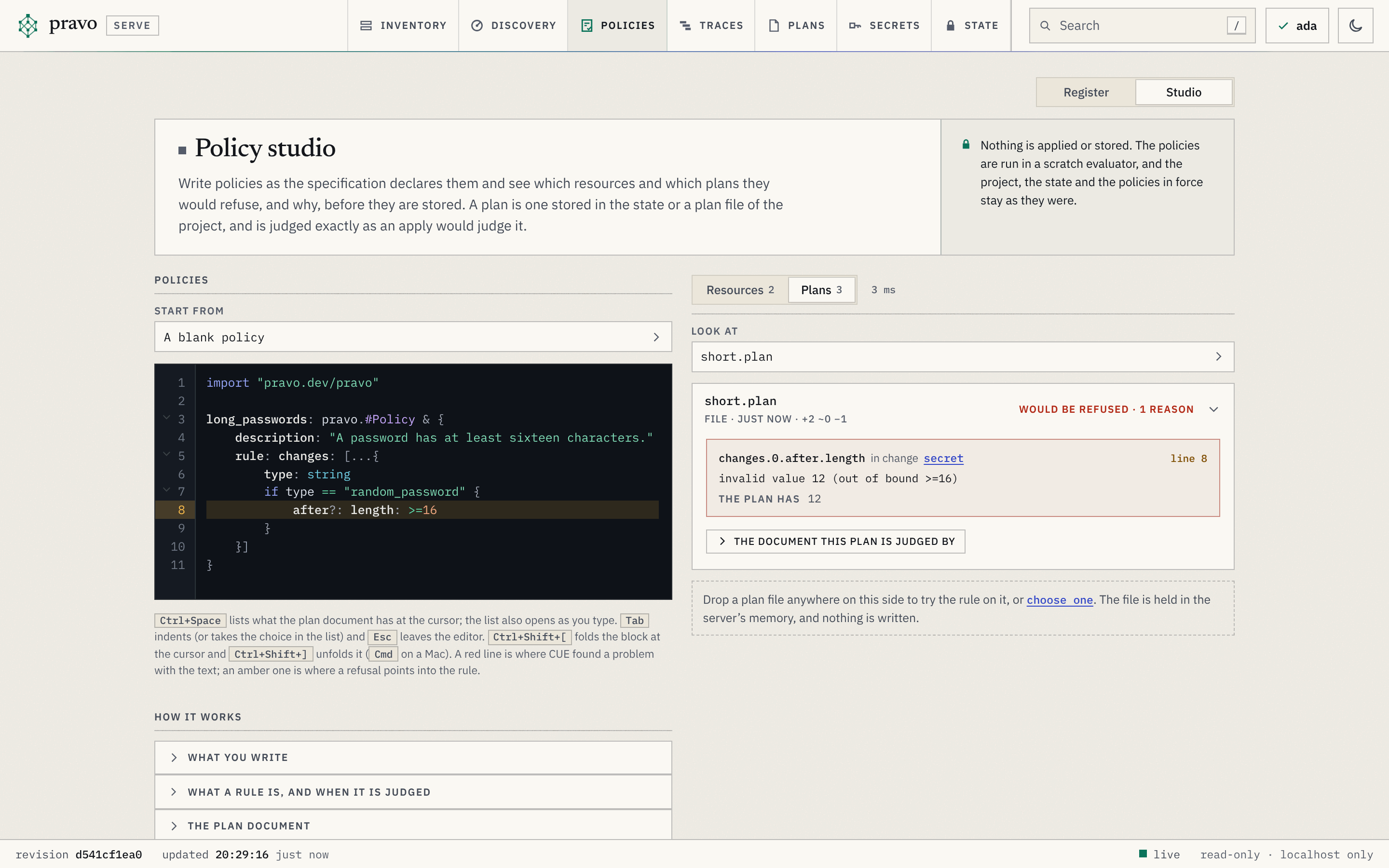 :::
`changes.0` is a position in the list, the first change of the plan, and the reason names it, `secret`, with the value the plan has. The message is the one A5 showed for a value outside a bound. The rule did not have to name `secret`: it holds for every password the team will ever plan. The file gives the same verdict on both plans:
```sh run exit=5
pravo policy test rules/long_passwords.cue --plan short.plan --plan add.plan
```
```text out
Policy long_passwords (rules/long_passwords.cue: long_passwords)
✗ short.plan file would be refused
long_passwords: changes.0.after.length: invalid value 12 (out of bound >=16)
change secret; the plan has 12
✓ add.plan file holds
1 of 2 judged plans hold.
Error: 1 plan would be refused
```
## Hold it against the estate
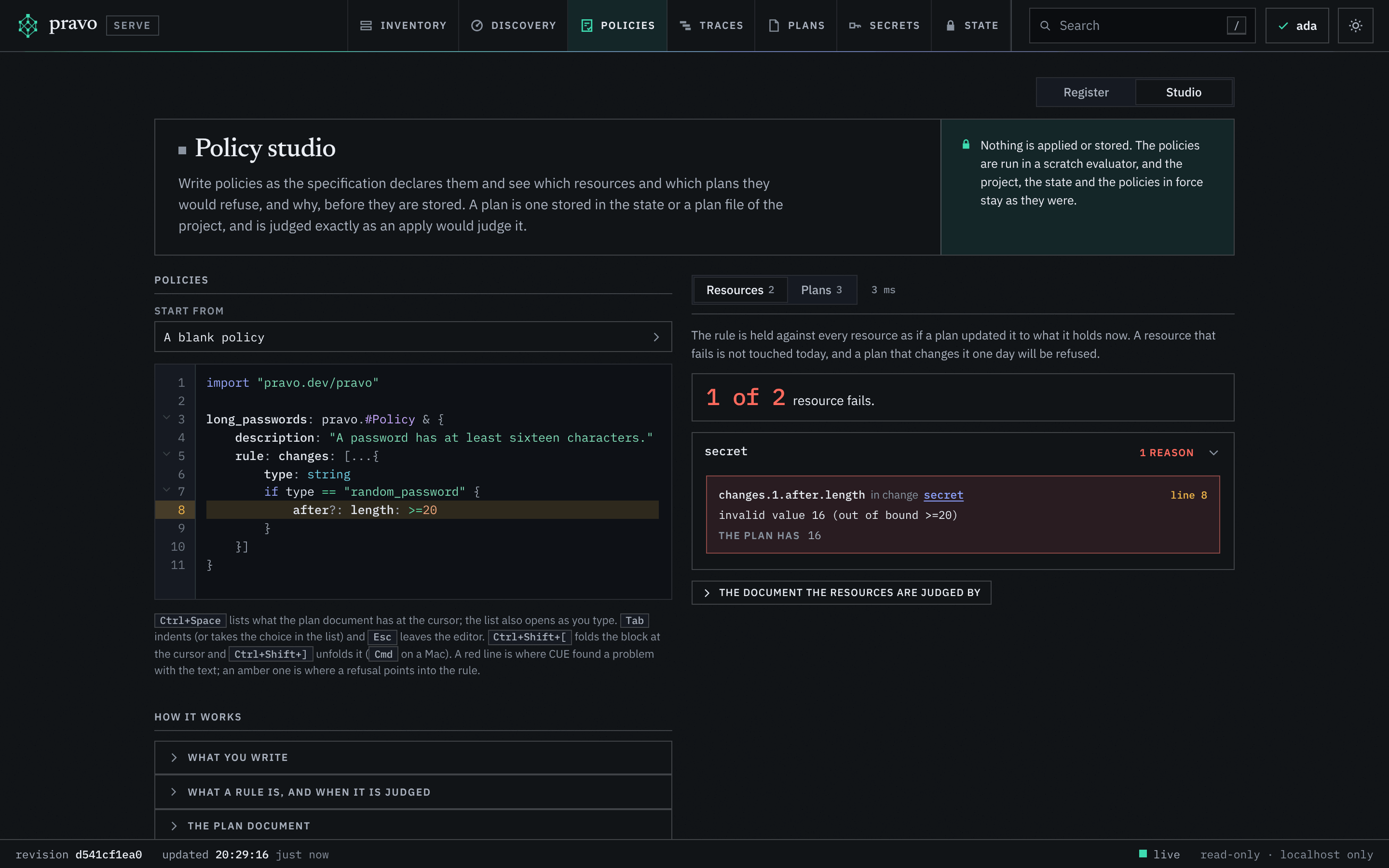
A plan file is one change. The other side of the switch, Resources, holds the rule against every resource of the state as if one plan updated them all to what they hold now: the answer to the question what in the estate the rule would refuse today. The password in the state has sixteen characters, so `long_passwords` passes both resources. Raise the bound in the editor to `>=20`, and turn the switch to Resources.
:::figure The same rule with its bound raised, held against the resources: `secret`, with the sixteen characters it has, fails.
:::
`changes.0` is a position in the list, the first change of the plan, and the reason names it, `secret`, with the value the plan has. The message is the one A5 showed for a value outside a bound. The rule did not have to name `secret`: it holds for every password the team will ever plan. The file gives the same verdict on both plans:
```sh run exit=5
pravo policy test rules/long_passwords.cue --plan short.plan --plan add.plan
```
```text out
Policy long_passwords (rules/long_passwords.cue: long_passwords)
✗ short.plan file would be refused
long_passwords: changes.0.after.length: invalid value 12 (out of bound >=16)
change secret; the plan has 12
✓ add.plan file holds
1 of 2 judged plans hold.
Error: 1 plan would be refused
```
## Hold it against the estate
A plan file is one change. The other side of the switch, Resources, holds the rule against every resource of the state as if one plan updated them all to what they hold now: the answer to the question what in the estate the rule would refuse today. The password in the state has sixteen characters, so `long_passwords` passes both resources. Raise the bound in the editor to `>=20`, and turn the switch to Resources.
:::figure The same rule with its bound raised, held against the resources: `secret`, with the sixteen characters it has, fails.
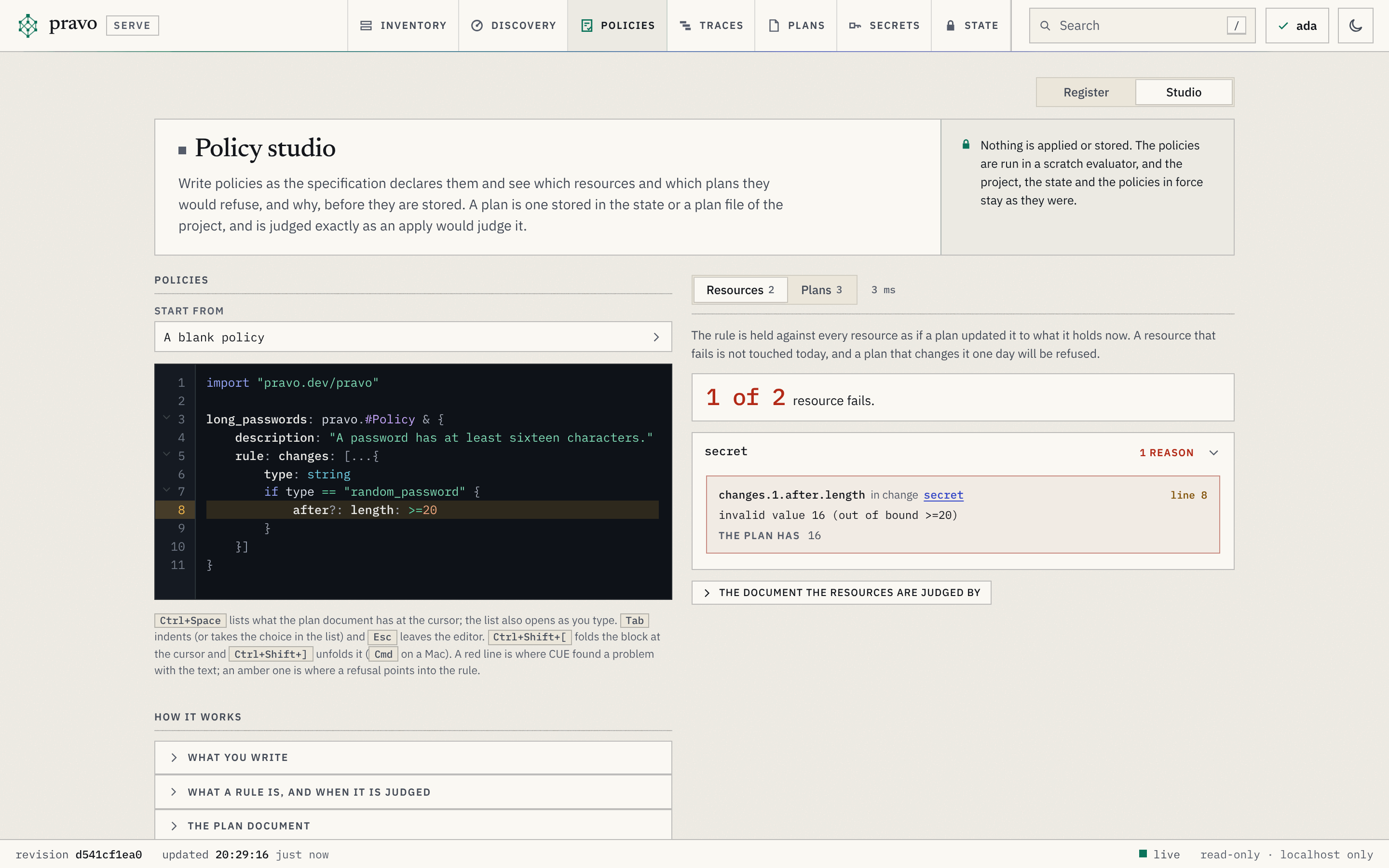 :::
The resources are judged as one plan, so `secret` is `changes.1`, after the pet, and the value is the one the state holds. A resource that fails is not touched today. A plan that changes it one day will be refused, and the studio says so before the rule is in force, while the bound can still be talked about. Put it back to `>=16`.
## Say why
A conflict names a path and two values. For a rule that people will read in a refusal, `error()` from B11 writes the sentence, and the sentence can name the resource. In the studio the reason reads the sentence; so does the terminal.
```cue file=rules/no_replace.cue title="rules/no_replace.cue"
import "pravo.dev/pravo"
no_replace: pravo.#Policy & {
description: "A replacement destroys the old object. It needs a maintenance window."
rule: changes: [...{
addr: string
action: string
if action == "replace" {
error("\(addr): a replacement needs a maintenance window")
}
}]
}
```
```sh run exit=5
pravo policy test rules/no_replace.cue --plan longer.plan
```
```text out
Policy no_replace (rules/no_replace.cue: no_replace)
✗ longer.plan file would be refused
no_replace: changes.0: secret: a replacement needs a maintenance window
change secret
0 of 1 judged plan hold.
Error: 1 plan would be refused
```
Three rules, three ways to write one: a shape for a count, a template with a bound for a value, and a template with a message for an action. Each reads one or two fields of the document and leaves the rest alone.
## Break it: a field that is not there
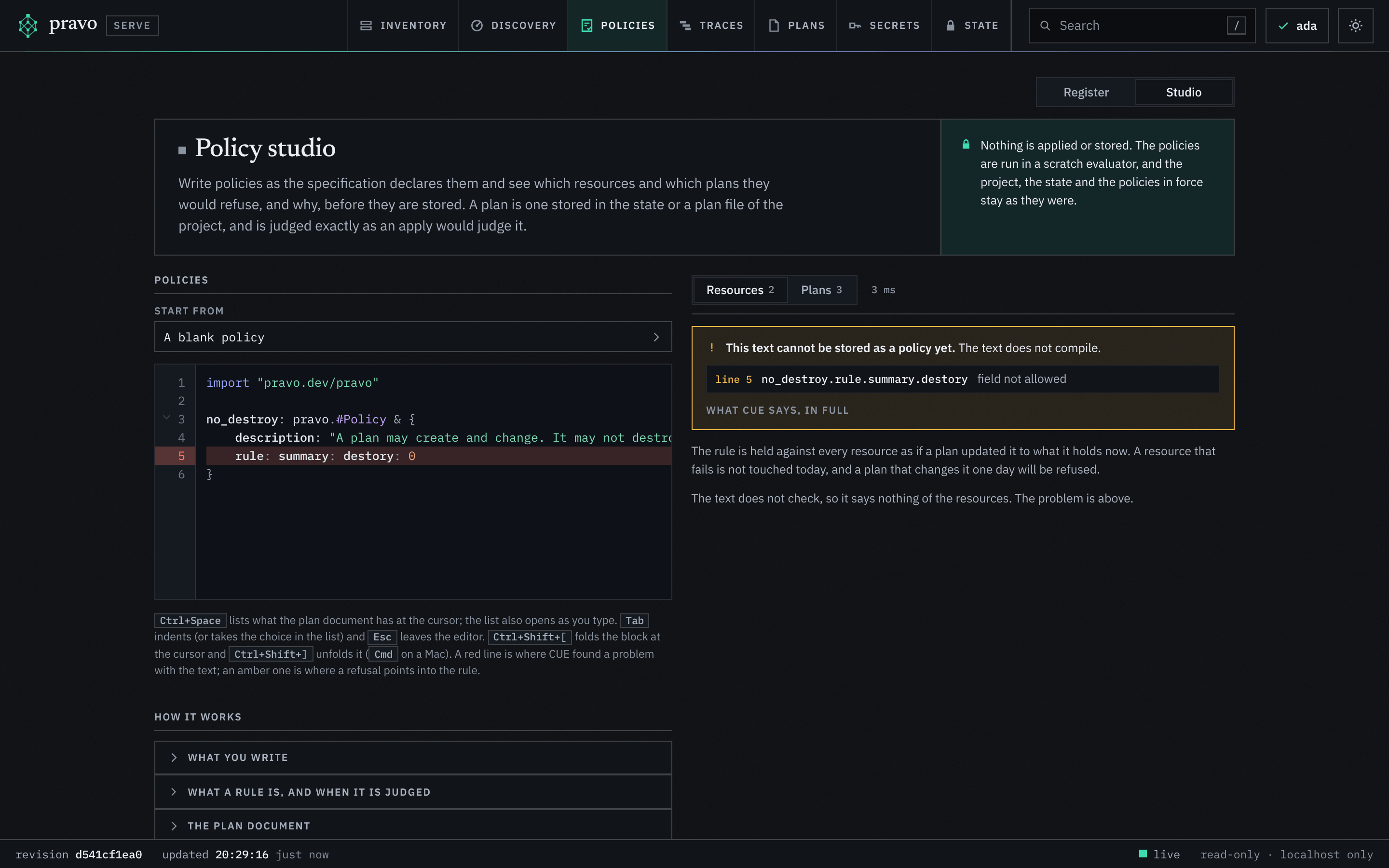
A rule that misspells a field would hold for every plan, because no plan has the field it names. pravo closes that door: the document has a schema, `pravo.#Plan`, and a rule is checked against it when it is loaded. Put `no_destroy` back into the editor and misspell `destroy`:
:::figure A misspelt field. The line is red, and the verdict says the text cannot be stored as a policy, before anything is judged.
:::
The resources are judged as one plan, so `secret` is `changes.1`, after the pet, and the value is the one the state holds. A resource that fails is not touched today. A plan that changes it one day will be refused, and the studio says so before the rule is in force, while the bound can still be talked about. Put it back to `>=16`.
## Say why
A conflict names a path and two values. For a rule that people will read in a refusal, `error()` from B11 writes the sentence, and the sentence can name the resource. In the studio the reason reads the sentence; so does the terminal.
```cue file=rules/no_replace.cue title="rules/no_replace.cue"
import "pravo.dev/pravo"
no_replace: pravo.#Policy & {
description: "A replacement destroys the old object. It needs a maintenance window."
rule: changes: [...{
addr: string
action: string
if action == "replace" {
error("\(addr): a replacement needs a maintenance window")
}
}]
}
```
```sh run exit=5
pravo policy test rules/no_replace.cue --plan longer.plan
```
```text out
Policy no_replace (rules/no_replace.cue: no_replace)
✗ longer.plan file would be refused
no_replace: changes.0: secret: a replacement needs a maintenance window
change secret
0 of 1 judged plan hold.
Error: 1 plan would be refused
```
Three rules, three ways to write one: a shape for a count, a template with a bound for a value, and a template with a message for an action. Each reads one or two fields of the document and leaves the rest alone.
## Break it: a field that is not there
A rule that misspells a field would hold for every plan, because no plan has the field it names. pravo closes that door: the document has a schema, `pravo.#Plan`, and a rule is checked against it when it is loaded. Put `no_destroy` back into the editor and misspell `destroy`:
:::figure A misspelt field. The line is red, and the verdict says the text cannot be stored as a policy, before anything is judged.
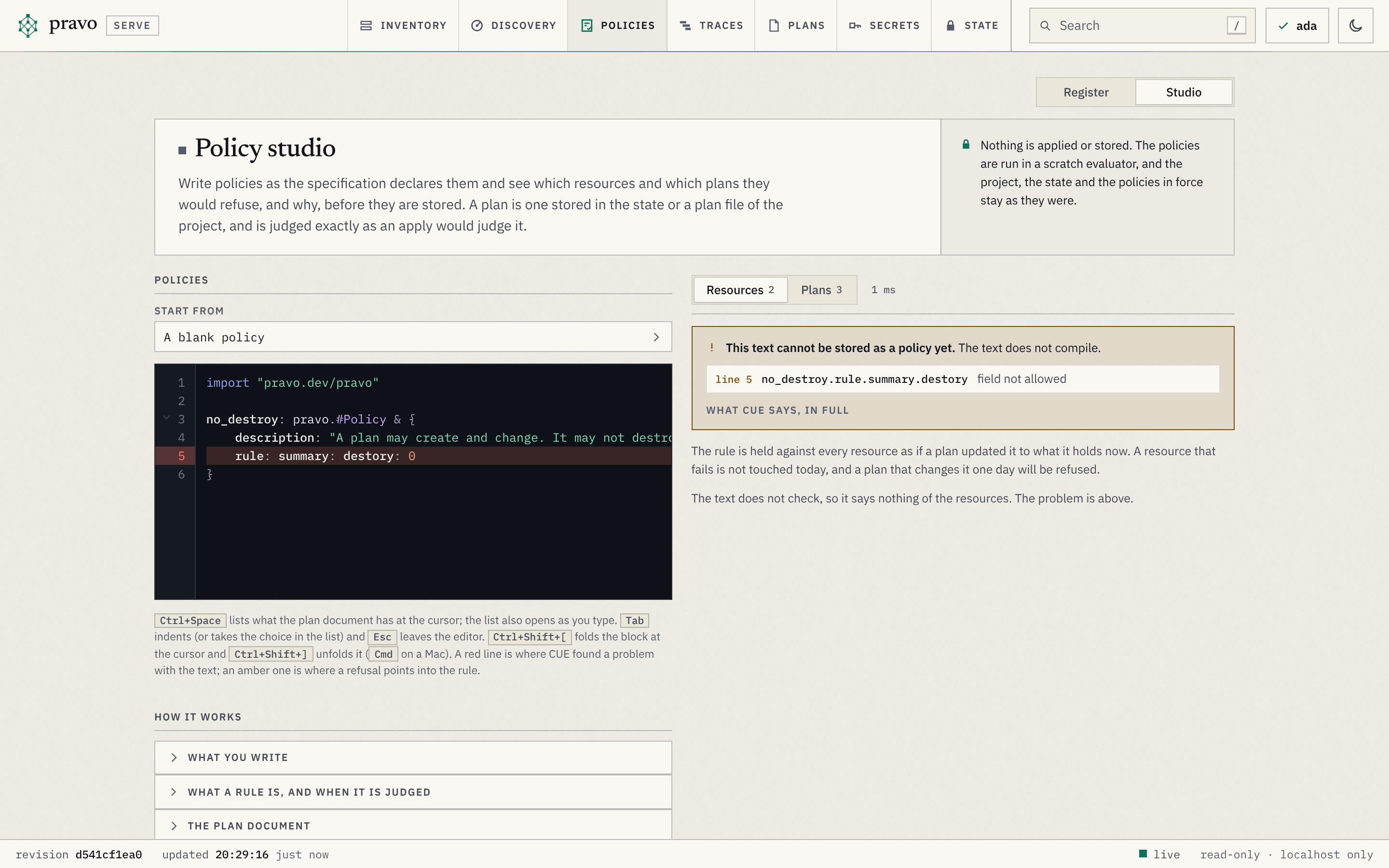 :::
`field not allowed` is the error of A8: a definition rejects a field it does not declare. The rule is refused before it judges anything. The same text as a file is refused by `policy test` with exit code 6, and the block carries `status=conflict`.
```cue file=rules/typo.cue title="rules/typo.cue" status=conflict
import "pravo.dev/pravo"
no_destroy: pravo.#Policy & {
description: "A plan may create and change. It may not destroy."
rule: summary: destory: 0
}
```
```sh run exit=6
pravo policy test rules/typo.cue --plan add.plan
```
```text out
Policy typo (rules/typo.cue: no_destroy)
cannot be used: no_destroy.rule.summary.destory: field not allowed:
policy.cue:5:17
Error: 1 rule cannot be used
```
The same check runs when a policy is added to the root, with one change that holds no values, so that a template which reads a field no change has is caught then and not at the first plan that happens to have one.
## Put a rule in force
A rule on trial is text in the editor and a file in `rules/`. A policy in force is the same text in the root, with the package clause of the specification, and the apply that carries it writes it to the state as a signed version. Restore the length first, and put `long_passwords` in the root.
```cue file=main.cue title="main.cue"
package team
import rnd "pravo.dev/providers/hashicorp/random"
$random: rnd.#Provider & {$version: "~> 3.6"}
pet: $random.#Resource.random_pet & {length: 2}
secret: $random.#Resource.random_password & {length: 16}
second: $random.#Resource.random_pet & {length: 2, prefix: "db"}
```
```cue file=policy.cue title="policy.cue"
package team
import "pravo.dev/pravo"
long_passwords: pravo.#Policy & {
description: "A password has at least sixteen characters."
rule: changes: [...{
type: string
if type == "random_password" {
after?: length: >=16
}
}]
}
```
```sh run
pravo apply --auto-approve | grep -E '^(Policies| \+ long|Apply complete)'
```
```text out
Policies: +1 new, ~0 changed, -0 removed.
+ long_passwords (sha256:)
Policies: +1 new, ~0 changed, -0 removed.
Apply complete! Resources: 1 added, 0 changed, 0 destroyed. [txn ]
```
The plan that adds a policy is not judged by it. From this apply on, every plan against the state is, and a short password is refused where the studio and `policy test` said it would be:
```sh run
sed -i 's/length: 16/length: 12/' main.cue
pravo plan > plan.out 2>&1; echo "exit=$?"
sed -n '/^Error/,$p' plan.out
```
```text out
exit=5
Error: the plan violates the policy long_passwords@1 (sha256:):
changes.0.after.length: invalid value 12 (out of bound >=16):
long_passwords:5:12
plan:1:137
```
The refusal names the version of the policy, the digest of its text, the path in the document and the line of the rule. A plan that holds is applied, and the transaction keeps a receipt: the versions and digests of the policies that judged it, so that the log says not only who applied but under which rules.
```sh run
sed -i 's/length: 12/length: 16/' main.cue
sed -i 's/prefix: "db"/prefix: "web"/' main.cue
pravo apply --auto-approve | grep '^Apply complete'
pravo state log --json | jq -c '.[0].policies'
```
```text out
Apply complete! Resources: 1 added, 0 changed, 1 destroyed. [txn ]
["long_passwords@1:"]
```
In the viewer, the register of the Policies section lists `long_passwords` as version 1 in force, with the text that was signed, and Try on plans opens the studio with it, for the next change to the rule.
## Exercise
:::exercise A rule for the names
Write a rule in `rules/pet_names.cue` that says every `random_pet` has a `length` of at least 2. Try it in the studio against the resources, where every pet has two words, and show with `policy test` that a plan which shortens `second` to one word would be refused.
::hint
The shape is the one of `long_passwords`, with the type and the bound changed.
::hint
A plan file to test it on: set `length: 1` on `second`, save the plan with `--out`, and put the length back. The policy in force has nothing to say about pets, so the plan is saved.
::solution
```cue file=rules/pet_names.cue title="rules/pet_names.cue"
import "pravo.dev/pravo"
pet_names: pravo.#Policy & {
description: "A pet name has at least two words."
rule: changes: [...{
type: string
if type == "random_pet" {
after?: length: >=2
}
}]
}
```
Against the resources, both pets pass. Against the plan:
```sh run exit=5
sed -i 's/length: 2, prefix: "web"/length: 1, prefix: "web"/' main.cue
pravo plan --out one-word.plan > /dev/null
sed -i 's/length: 1, prefix: "web"/length: 2, prefix: "web"/' main.cue
pravo policy test rules/pet_names.cue --plan one-word.plan
```
```text out
Policy pet_names (rules/pet_names.cue: pet_names)
✗ one-word.plan file would be refused
pet_names: changes.0.after.length: invalid value 1 (out of bound >=2)
change second; the plan has 1
0 of 1 judged plan hold.
Error: 1 plan would be refused
```
```sh run check
pravo policy test rules/pet_names.cue --plan one-word.plan > /dev/null 2>&1 || test $? -eq 5
```
:::
## Clean up
Stop the viewer with Ctrl-C, and destroy the resources:
```sh run
pravo destroy --auto-approve | tail -n 1
```
```text out
Destroy complete! Resources: 0 added, 0 changed, 3 destroyed. [txn ]
```
## Recap
- A rule is a CUE value that the plan document has to unify with. A shape for a count, a list template with a guard and a bound for a value, a template with `error()` for a message that names the resource.
- The policy studio, `s` in the viewer, holds the text of a policy against the plan files of the root and the plans stored in the state, or against every resource of the state as if a plan updated it, as you type. `pravo policy test RULE.cue --plan FILE` gives the same verdict in a terminal, with exit code 5 when a plan would be refused. Neither applies or stores anything.
- The document has a schema. A rule that names a field the document does not have is refused when it is loaded, with `field not allowed`.
- In the root, a rule is a `pravo.#Policy` node. The apply that carries it writes a signed version, every later plan is judged by it, and the transaction keeps the versions that judged it.
:::check
`summary: destroy: 0` is in force. A plan adds twenty passwords of one character each. What happens?
::answer
It is applied. The rule has an opinion on `summary.destroy` and on nothing else. A rule about the passwords is a template over `changes`.
Why does `pravo policy test` refuse `rules/typo.cue` with exit code 6 and not hold it against the plans?
::answer
The rule names `summary.destory`, which the schema of the document does not have. A rule is checked against `pravo.#Plan` when it is loaded, so that a misspelt field does not hold silently for every plan.
:::
The how-to page [Write and roll out policies](../how-to/policies.md) tests rules on fixtures in a pipeline, rolls a rule out as advice and retires one. [Writing policies](../reference/policies-writing.md) lists the shapes that work and the ones that do not. The next lesson, [Ask for approvals](c06-ask-for-approvals.md), writes a rule that does not refuse a plan but makes it wait for a second person.
:::
`field not allowed` is the error of A8: a definition rejects a field it does not declare. The rule is refused before it judges anything. The same text as a file is refused by `policy test` with exit code 6, and the block carries `status=conflict`.
```cue file=rules/typo.cue title="rules/typo.cue" status=conflict
import "pravo.dev/pravo"
no_destroy: pravo.#Policy & {
description: "A plan may create and change. It may not destroy."
rule: summary: destory: 0
}
```
```sh run exit=6
pravo policy test rules/typo.cue --plan add.plan
```
```text out
Policy typo (rules/typo.cue: no_destroy)
cannot be used: no_destroy.rule.summary.destory: field not allowed:
policy.cue:5:17
Error: 1 rule cannot be used
```
The same check runs when a policy is added to the root, with one change that holds no values, so that a template which reads a field no change has is caught then and not at the first plan that happens to have one.
## Put a rule in force
A rule on trial is text in the editor and a file in `rules/`. A policy in force is the same text in the root, with the package clause of the specification, and the apply that carries it writes it to the state as a signed version. Restore the length first, and put `long_passwords` in the root.
```cue file=main.cue title="main.cue"
package team
import rnd "pravo.dev/providers/hashicorp/random"
$random: rnd.#Provider & {$version: "~> 3.6"}
pet: $random.#Resource.random_pet & {length: 2}
secret: $random.#Resource.random_password & {length: 16}
second: $random.#Resource.random_pet & {length: 2, prefix: "db"}
```
```cue file=policy.cue title="policy.cue"
package team
import "pravo.dev/pravo"
long_passwords: pravo.#Policy & {
description: "A password has at least sixteen characters."
rule: changes: [...{
type: string
if type == "random_password" {
after?: length: >=16
}
}]
}
```
```sh run
pravo apply --auto-approve | grep -E '^(Policies| \+ long|Apply complete)'
```
```text out
Policies: +1 new, ~0 changed, -0 removed.
+ long_passwords (sha256:)
Policies: +1 new, ~0 changed, -0 removed.
Apply complete! Resources: 1 added, 0 changed, 0 destroyed. [txn ]
```
The plan that adds a policy is not judged by it. From this apply on, every plan against the state is, and a short password is refused where the studio and `policy test` said it would be:
```sh run
sed -i 's/length: 16/length: 12/' main.cue
pravo plan > plan.out 2>&1; echo "exit=$?"
sed -n '/^Error/,$p' plan.out
```
```text out
exit=5
Error: the plan violates the policy long_passwords@1 (sha256:):
changes.0.after.length: invalid value 12 (out of bound >=16):
long_passwords:5:12
plan:1:137
```
The refusal names the version of the policy, the digest of its text, the path in the document and the line of the rule. A plan that holds is applied, and the transaction keeps a receipt: the versions and digests of the policies that judged it, so that the log says not only who applied but under which rules.
```sh run
sed -i 's/length: 12/length: 16/' main.cue
sed -i 's/prefix: "db"/prefix: "web"/' main.cue
pravo apply --auto-approve | grep '^Apply complete'
pravo state log --json | jq -c '.[0].policies'
```
```text out
Apply complete! Resources: 1 added, 0 changed, 1 destroyed. [txn ]
["long_passwords@1:"]
```
In the viewer, the register of the Policies section lists `long_passwords` as version 1 in force, with the text that was signed, and Try on plans opens the studio with it, for the next change to the rule.
## Exercise
:::exercise A rule for the names
Write a rule in `rules/pet_names.cue` that says every `random_pet` has a `length` of at least 2. Try it in the studio against the resources, where every pet has two words, and show with `policy test` that a plan which shortens `second` to one word would be refused.
::hint
The shape is the one of `long_passwords`, with the type and the bound changed.
::hint
A plan file to test it on: set `length: 1` on `second`, save the plan with `--out`, and put the length back. The policy in force has nothing to say about pets, so the plan is saved.
::solution
```cue file=rules/pet_names.cue title="rules/pet_names.cue"
import "pravo.dev/pravo"
pet_names: pravo.#Policy & {
description: "A pet name has at least two words."
rule: changes: [...{
type: string
if type == "random_pet" {
after?: length: >=2
}
}]
}
```
Against the resources, both pets pass. Against the plan:
```sh run exit=5
sed -i 's/length: 2, prefix: "web"/length: 1, prefix: "web"/' main.cue
pravo plan --out one-word.plan > /dev/null
sed -i 's/length: 1, prefix: "web"/length: 2, prefix: "web"/' main.cue
pravo policy test rules/pet_names.cue --plan one-word.plan
```
```text out
Policy pet_names (rules/pet_names.cue: pet_names)
✗ one-word.plan file would be refused
pet_names: changes.0.after.length: invalid value 1 (out of bound >=2)
change second; the plan has 1
0 of 1 judged plan hold.
Error: 1 plan would be refused
```
```sh run check
pravo policy test rules/pet_names.cue --plan one-word.plan > /dev/null 2>&1 || test $? -eq 5
```
:::
## Clean up
Stop the viewer with Ctrl-C, and destroy the resources:
```sh run
pravo destroy --auto-approve | tail -n 1
```
```text out
Destroy complete! Resources: 0 added, 0 changed, 3 destroyed. [txn ]
```
## Recap
- A rule is a CUE value that the plan document has to unify with. A shape for a count, a list template with a guard and a bound for a value, a template with `error()` for a message that names the resource.
- The policy studio, `s` in the viewer, holds the text of a policy against the plan files of the root and the plans stored in the state, or against every resource of the state as if a plan updated it, as you type. `pravo policy test RULE.cue --plan FILE` gives the same verdict in a terminal, with exit code 5 when a plan would be refused. Neither applies or stores anything.
- The document has a schema. A rule that names a field the document does not have is refused when it is loaded, with `field not allowed`.
- In the root, a rule is a `pravo.#Policy` node. The apply that carries it writes a signed version, every later plan is judged by it, and the transaction keeps the versions that judged it.
:::check
`summary: destroy: 0` is in force. A plan adds twenty passwords of one character each. What happens?
::answer
It is applied. The rule has an opinion on `summary.destroy` and on nothing else. A rule about the passwords is a template over `changes`.
Why does `pravo policy test` refuse `rules/typo.cue` with exit code 6 and not hold it against the plans?
::answer
The rule names `summary.destory`, which the schema of the document does not have. A rule is checked against `pravo.#Plan` when it is loaded, so that a misspelt field does not hold silently for every plan.
:::
The how-to page [Write and roll out policies](../how-to/policies.md) tests rules on fixtures in a pipeline, rolls a rule out as advice and retires one. [Writing policies](../reference/policies-writing.md) lists the shapes that work and the ones that do not. The next lesson, [Ask for approvals](c06-ask-for-approvals.md), writes a rule that does not refuse a plan but makes it wait for a second person.