
§ C7 · Track C · A team on one state
Read a run
Turn the recording on and read what a command did, as a tree of spans with their timings. Find where the time went and where a failed run stopped, in the viewer and with jq, and see what a recorded run never holds.
On this page
An apply took four minutes, and nobody can say where. In OpenTofu the answer is TF_LOG=DEBUG: megabytes of lines, every request and response of every provider, and no timing per resource. A run that failed says which resource, and the twenty lines around it are the context.
TF_LOG=DEBUG terraform apply 2> debug.log     # 40,000 lines
grep -n 'Creation complete' debug.log         # timings, if you can find them
pravo records a run as a tree of spans: the command, the stages of its engine, each resource, each call to a provider, each request to the state, and each request that went over the network, with a start and a duration for each. With PRAVO_TRACES=on the tree is kept in the project, one file per command, and the viewer draws it as a timeline. No collector, no account, no agent.
Turn the recording on
Work in an empty directory: it is the root, with a name and a file that holds it, and the state in a local directory.
package traced

import (
	rnd "pravo.dev/providers/hashicorp/random"
	loc "pravo.dev/providers/hashicorp/local"
)

$random: rnd.#Provider & {$version: "~> 3.6"}
$local: loc.#Provider & {$version: "~> 2.5"}

server: $random.#Resource.random_pet & {length: 2}

note: $local.#Resource.local_file & {
	filename: "out/note.txt"
	content:  "\(server.id)\n"
}
Nothing is recorded until you ask. PRAVO_TRACES=on in the environment of a command keeps its trace, and export PRAVO_TRACES=on keeps it for every command of the session.
Apply complete! Resources: 2 added, 0 changed, 0 destroyed. [txn <txn>]
<trace id>-<span id>.jsonThe file is named by the trace and its first span, and it is written in the directory the command ran in. The directory keeps the newest hundred runs, and a .gitignore in it keeps them out of the repository. A command that did no work, such as pravo version, writes nothing.
The shape of a run
The file is JSON, and jq reads it. The first span is the command, and every other span has a parent. The first word of a span's name is its kind:
pravo apply
      4 config
      2 engine
     17 phase
      1 pravo
     18 provider
      4 resource
     11 setup
22 stateEighty spans for two resources. engine is the plan and the apply; phase the stages inside each, evaluate, refresh, apply changes; resource one span per resource per stage; provider the calls to the providers; state the requests to the state store. The spans of one resource, with their durations in microseconds, show what an apply of a resource is made of:
      2 resource note
      2 provider ApplyResourceChange
      2 provider ConfigureProvider
      4 provider PlanResourceChange
      2 provider ReadResource
      2 provider UpgradeResourceState
      2 provider ValidateProviderConfig
4 provider ValidateResourceConfigTwo spans for note: one under the plan, one under the apply. The provider calls are the protocol that B1 described, seen from the other side: the configuration of the provider and its validation, the read and the upgrade of each record, the plan of each change and the change itself, for each of two providers.
Read it in the viewer
pravo serve
Press r, or open Traces from the bar. The runs are listed newest first, with the command, the age, how long it took and the resources it handled, and the newest is open as a timeline.
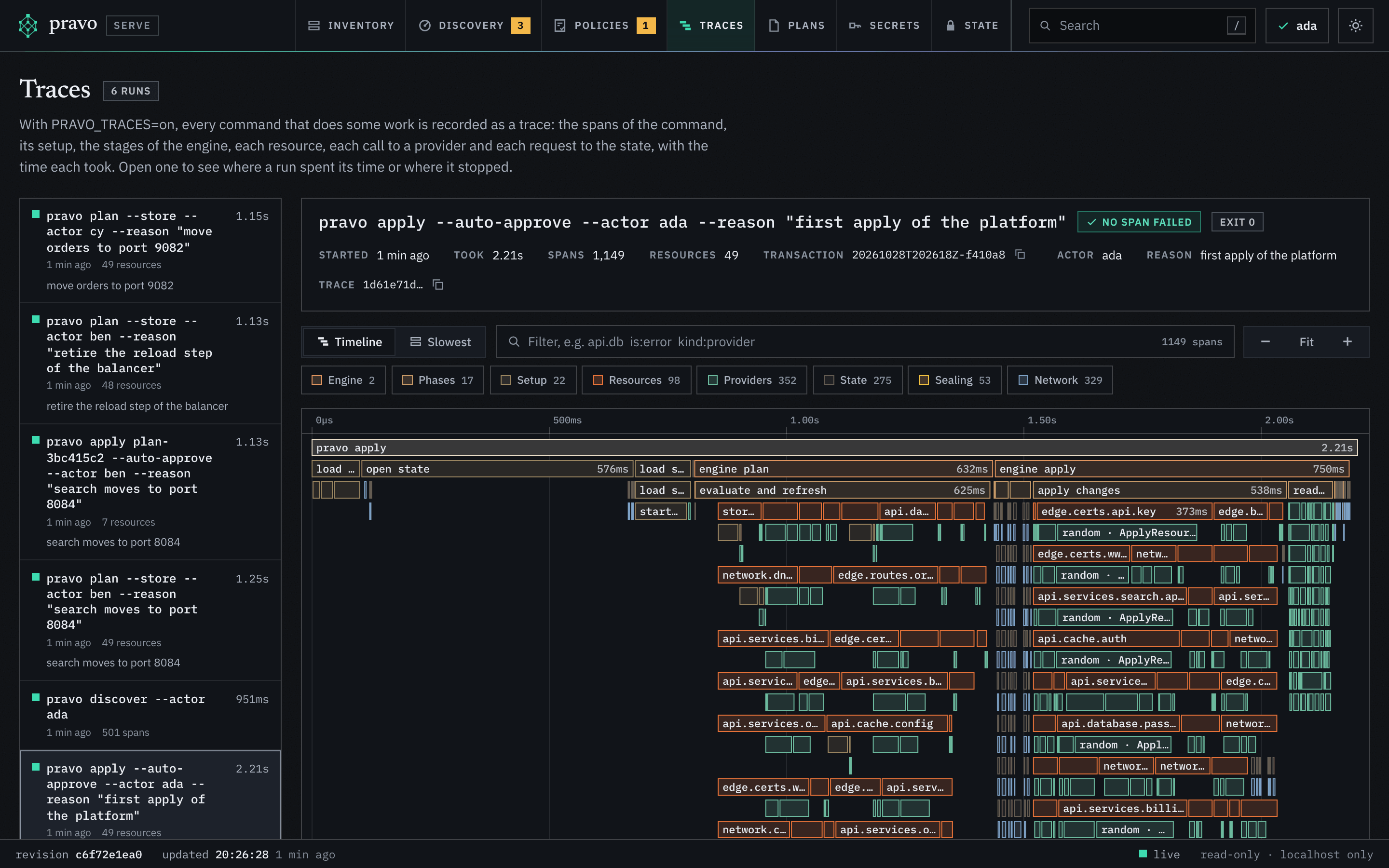
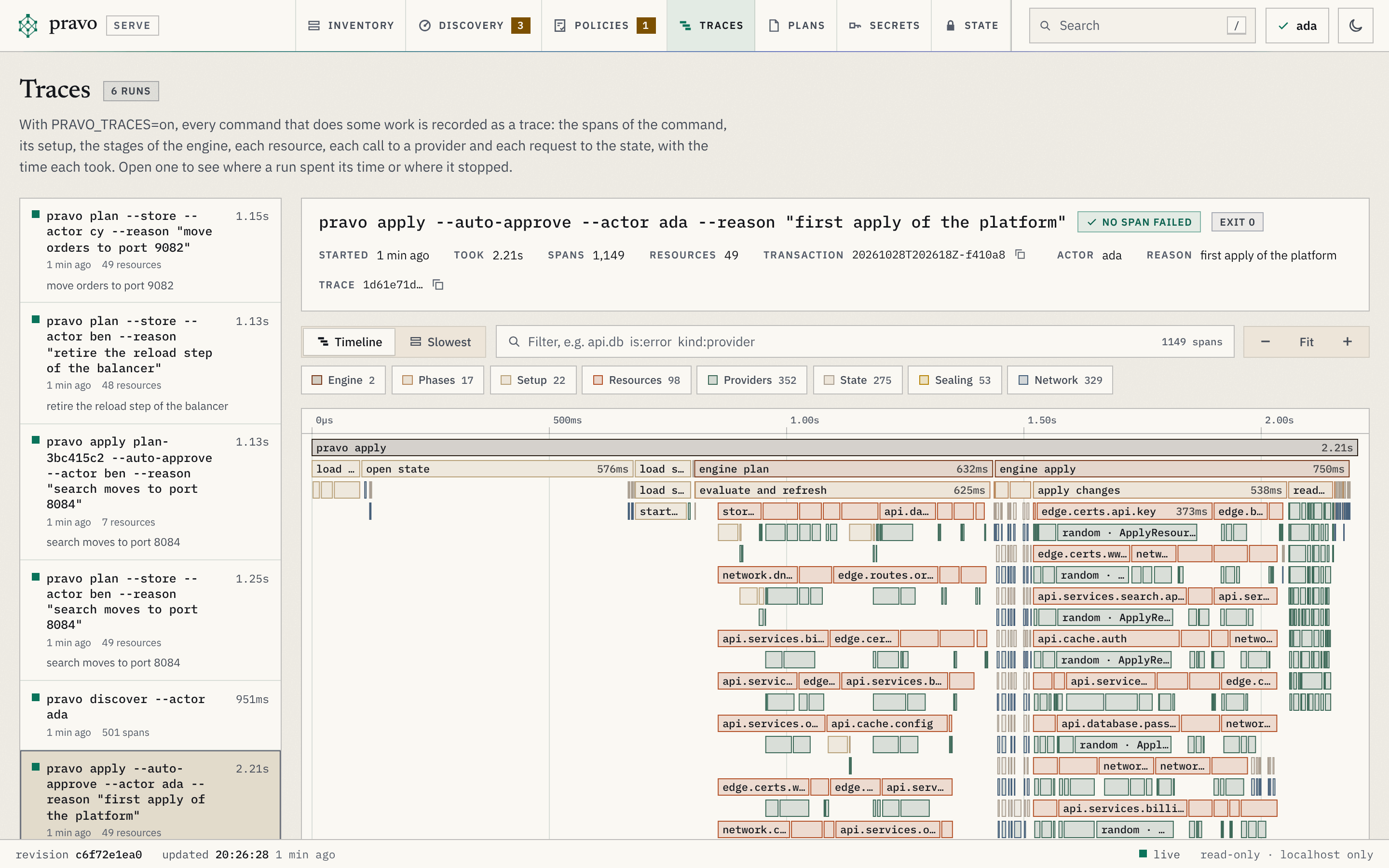
Time runs across and nesting runs down. The width of a bar is how long it took; two bars in one row ran one after the other, and two rows ran at the same time. The switch to Slowest turns the spans into a table, longest first, with a column for the time a span spent in no part of its own: a resource that took four seconds, of which its provider call took 3.9, has little in itself, and a stage with a large figure spent its time between its parts, waiting on a lock or on the state. Click a bar for the detail of the span and its path from the command down.
Break it: a run that fails
Make the directory of the file a file, so that the provider cannot write there, and change the length of the name, so that the apply has to write the file again. -refresh=false keeps the plan from reading the file first, so that the run fails where a failed apply usually fails: at the call that writes.
exit=1
Error: note: Create local file error: An unexpected error occurred while writing the fileA failure happens in a call, and every span above the call sees it fail.
Predict The newest trace holds the failed run. Which spans carry the error, and which is the deepest one?
Five spans, from the command down: pravo apply, engine apply, phase apply changes, resource note, and provider ApplyResourceChange, which is where the run stopped. The error text is on the span, as the command printed it.
pravo apply
engine apply
phase apply changes
resource note
provider ApplyResourceChange
Create local file error: An unexpected error occurred while writing the file

+Original Error: open out/note.txt: not a directoryIn the viewer the run is marked failed, the spans that failed are red, and is:error in the filter box keeps only them. The deepest red span is where the run stopped, and its path says under which resource and which stage. For a run of two hundred resources, that is the difference between knowing and searching.
What a trace never holds
Addresses, types, actions, counts, outcomes and timings are recorded. Attribute values never are: not a value of the configuration, not a value of the state, not an id a provider returned, not an output. The name of the pet is not in the file, and neither would the password of C3 be. Error messages are recorded as they are printed, so a provider that quotes a value in its own error text puts it in the span, and the viewer masks it as it masks every text it shows.
0A recorded run is as private as the project that holds it, and no more: the path of a request to a bucket can name an object, and a team that sends the same spans to a collector with OTEL_EXPORTER_OTLP_ENDPOINT sends those paths with them. With the state in a bucket, each request over the network is a span of its own under the call that made it, with the method, the host, the path and the status, and never a header, a body or a query string; the how-to page Record what a run does shows them.
Exercise
A plan has a shape of its own
Record a plan, and show from its file which stages of the engine it ran and that nothing failed.
Hint 1
PRAVO_TRACES=on pravo plan records the plan, and the newest file in .pravo/traces is the one to read. ls -t lists the newest first.
Hint 2
The engine spans are the ones whose name starts with engine . A run in which nothing failed has no span with status set to error.
Solution
engine plan
0A plan runs the engine once, to plan, and an apply runs it twice. The second file in the directory is the failed apply, which the viewer still lists; the directory keeps the newest hundred.
Clean up
Put the directory back, so that the apply succeeds, then destroy.
Apply complete! Resources: 1 added, 0 changed, 0 destroyed. [txn <txn>]
Destroy complete! Resources: 0 added, 0 changed, 2 destroyed. [txn <txn>]Recap
PRAVO_TRACES=onkeeps the trace of every command that did some work in.pravo/traces, newest hundred, out of the repository. The file is JSON: the command first, then every span with its parent, its kind, its timing and its status.- The viewer draws a run as a timeline and lists its slowest spans. In a run that failed, the deepest span with an error is where it stopped, and its path says under which resource and stage.
- A trace holds names, counts, timings and outcomes, and never a value. An error message is kept as printed.
Check yourself
An apply of two hundred resources failed. How do you find the one that failed without reading the log?
Open the run in the Traces section, or filter the file for spans whose status is error. The deepest one is the provider call that failed, under its resource, under its stage.
Why is the name of the pet not in the trace file of the apply that created it?
A trace records addresses, types, actions, counts and timings, and no attribute value. The id a provider returned is a value.
The how-to page Record what a run does adds the requests over the network and a collector. Traces explains the spans, and Telemetry lists every variable, span and attribute. This is the last lesson of the track: the index says where to go from here.