
§ C2 · Track C · A team on one state
Store a plan
Put a plan in the state, so that the other person can list it, read it, see that it touches the same resource as theirs, and apply it by its id. What makes a stored plan stale, and when it goes away.
On this page
B7 saved a plan to a file and applied the file, so that what runs is what was read. The file belongs to the machine that made it. In OpenTofu the same is true of terraform plan -out=tfplan: the plan is an artifact that a pipeline passes from one job to the next, and nobody else knows that it exists. Two people can plan the same resource on the same afternoon and find out at apply time.
terraform plan -out=tfplan      # on your machine
terraform apply tfplan          # on your machine, or wherever you carry the file
pravo plan --store writes the plan into the state, next to the records. Anyone who can read the state can list it, read it and apply it by its id, from any checkout, and pravo tells each person which other plans want the same resources. A stored plan is checked as a plan file is: against the specification it was made from, the providers and the revision of every record it touches.
Store a plan
Work in an empty directory, with the two checkouts of C1: Ada's root names the in-memory bucket, and Dan's checkout is a copy of it. Nothing is applied yet.
package team

import (
	"pravo.dev/pravo"
	rnd "pravo.dev/providers/hashicorp/random"
)

$settings: pravo.#Settings & {
	state: pravo.#S3State & {
		backend:    "s3"
		bucket:     "northwind-state"
		prefix:     "prod"
		region:     "eu-west-1"
		endpoint:   "http://127.0.0.1:9000"
		path_style: true
	}
}

$random: rnd.#Provider

port: $random.#Resource.random_integer & {min: 20000, max: 29999, seed: "web"}
Ada plans with --store. The plan is printed as always, and the last lines say where it went:
Graph: planned 1

Stored the plan as plan-<id>; unless it is applied it is removed after 7 days. To apply exactly these actions, run:
pravo apply plan-<id>The id is plan- and the first eight hexadecimal digits of the plan's digest, so it differs on every run. The lesson keeps it in a file, and $(cat ada.id) stands for the id that pravo printed. Nothing was applied.
Read it from the other checkout
Dan lists the plans of the state and reads Ada's:
plan-<id>  pending  ada  just now  +1 ~0 -0  expires in 7 days
Stored plan plan-<id> by ada, just now (pending)
  reason:  Reserve a port for the web server
  command: pravo -C ada --actor ada --reason Reserve a port for the web server plan --store
  expires in 7 days
  apply:   pravo apply plan-<id>

pravo will perform the following actions:The listing has the id, the status, the author, the age, the counts of resources to add, change and destroy, and a note. pending means that the plan can be applied. plan show prints the plan itself after a header: the reason, the command that made it, when it expires and the command that applies it. The Plans section of the viewer shows the same list, with the resources that each plan touches drawn on the graph: See what your team has planned.
Two plans for one resource
Dan wants the range one narrower and changes his checkout.
package team

import (
	"pravo.dev/pravo"
	rnd "pravo.dev/providers/hashicorp/random"
)

$settings: pravo.#Settings & {
	state: pravo.#S3State & {
		backend:    "s3"
		bucket:     "northwind-state"
		prefix:     "prod"
		region:     "eu-west-1"
		endpoint:   "http://127.0.0.1:9000"
		path_style: true
	}
}

$random: rnd.#Provider

port: $random.#Resource.random_integer & {min: 20000, max: 29998, seed: "web"}
A stored plan is not a lock. Ask what pravo knows at this point, and what it can tell Dan.
Predict Dan stores a plan for port, which Ada's stored plan also creates. Does pravo refuse it?
No. The plan is stored, and pravo warns Dan that Ada's plan changes the same resource. The warning is information: it stops nothing and changes nothing in Ada's plan.
Graph: planned 1

Warning: plan-<id> by ada (just now) also changes 1 of these resources: port
Stored the plan as plan-<id>; unless it is applied it is removed after 7 days. To apply exactly these actions, run:
pravo apply plan-<id>plan list --touching ADDRESS lists the open plans that change one resource, and a plan that is not stored warns in the same way:
plan-<id>  pending  dan  just now  +1 ~0 -0  expires in 7 days
plan-<id> pending ada just now +1 ~0 -0 expires in 7 daysThe Plans section of the viewer, pravo -C dan serve and then p, lists both, newest first, with the note each author wrote as the title and a mark on each row that says another plan changes one of the same resources. View lays the plan of a row over the graph.
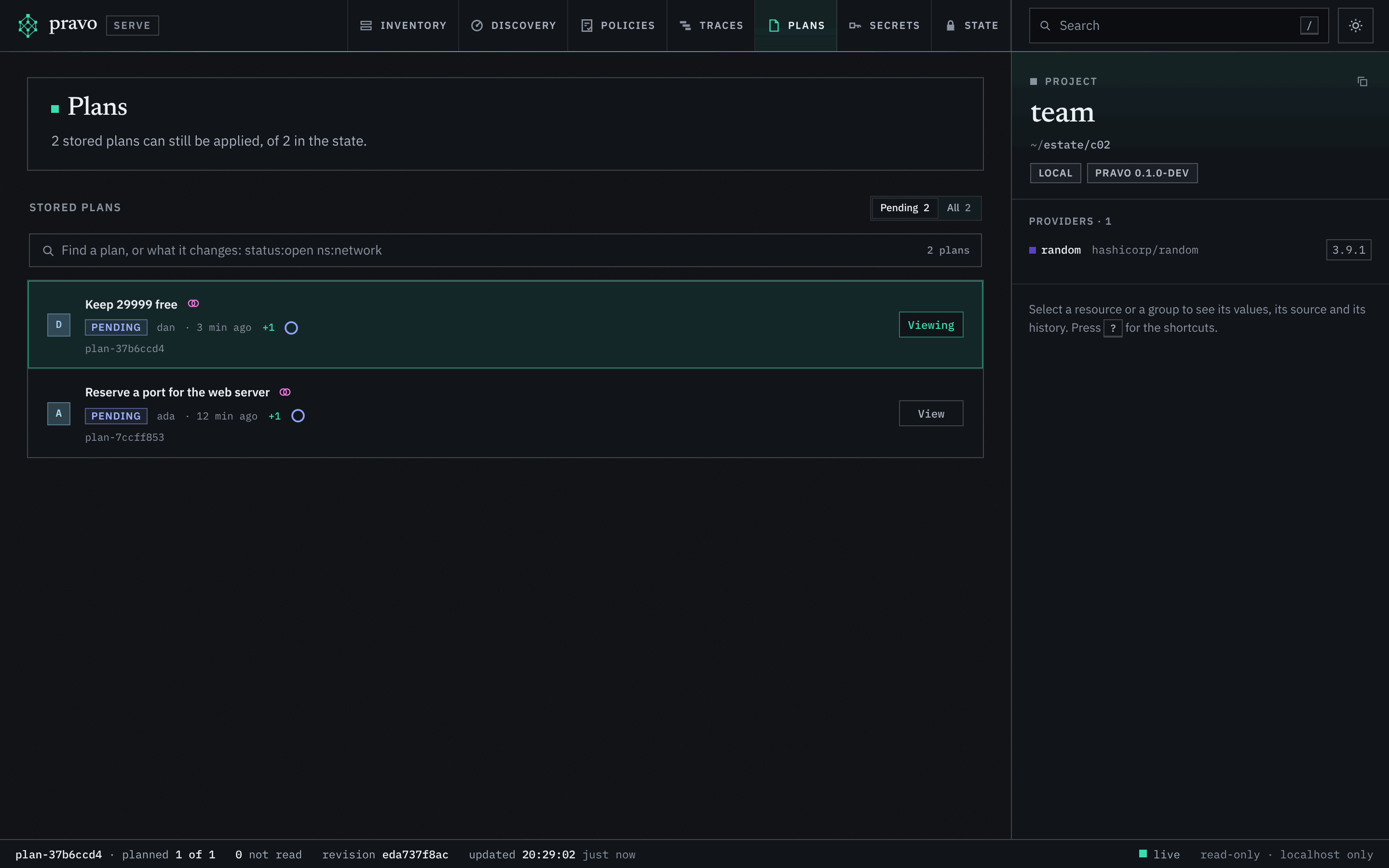
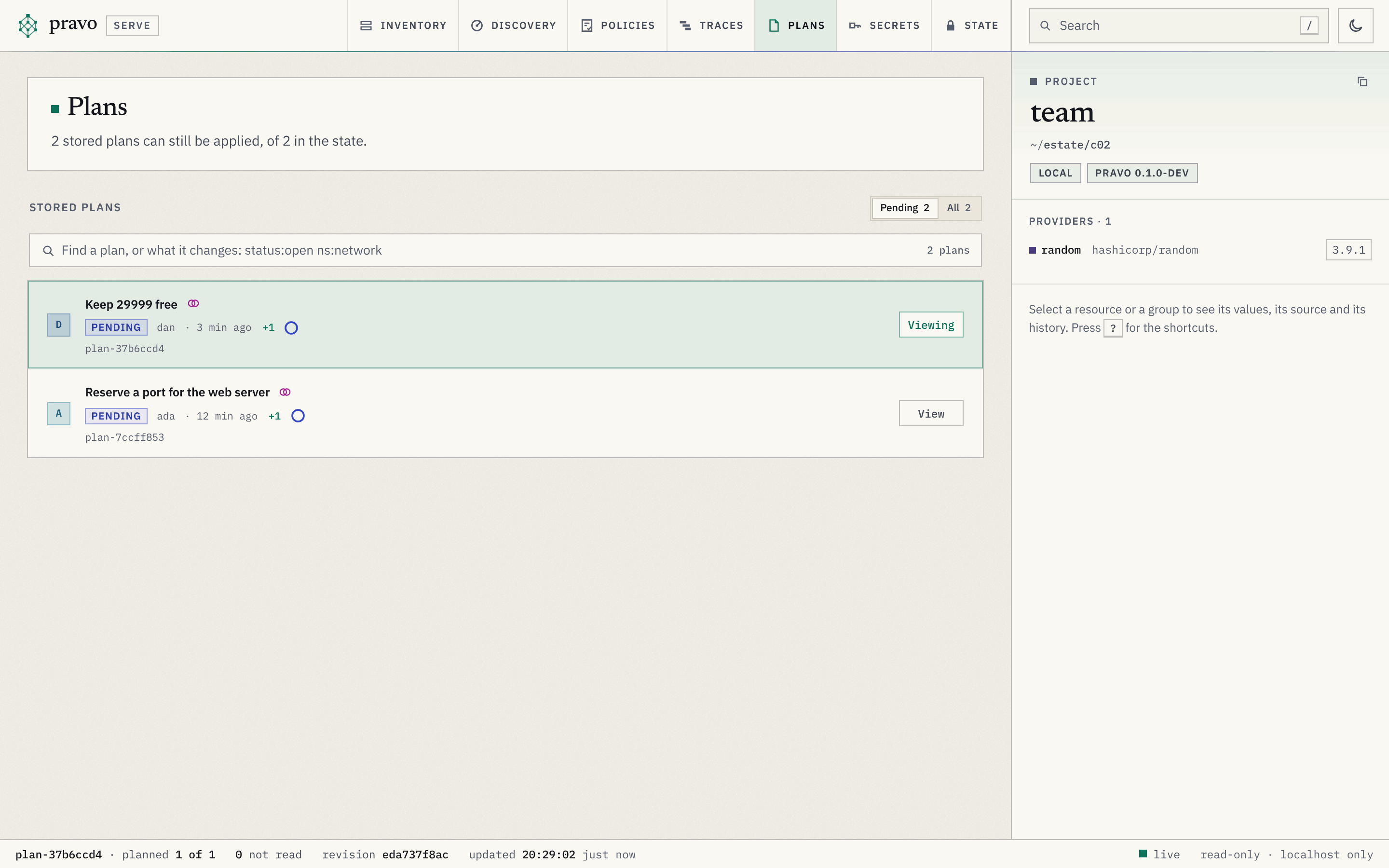
Dan's checkout differs from the files Ada planned from, so Ada's plan cannot be applied from it. plan show says so, and names the file:
Warning: this plan can no longer be applied: the configuration changed since the plan was made (main.cue changed)That is the check of B7, across checkouts. A stored plan is applied from a checkout that has the files it was made from, which in a repository means the same commit.
Apply by id
Ada applies her plan by its id, from her checkout. The checks are those of a plan file: the configuration, the providers, the lineage of the state and the revision of every record the plan touches.
port: Creating...
port: Creation complete after 0s [id=<id>]

Apply complete! Resources: 1 added, 0 changed, 0 destroyed. [txn <txn>]Break it: the plan that came second
Dan's plan assumed that port does not exist. The record has revision 1 now, and his plan expected revision 0. The listing shows it, and the apply refuses it.
No stored plan can be applied. "pravo plan list --all" lists the others.
plan-<id>  stale    dan  just now  +1 ~0 -0  port changed in state (revision 1, plan expected 0)
plan-<id> applied ada just now +1 ~0 -0 applied just nowError: saved plan is stale; run "pravo plan" again:
- port changed in state (revision 1, plan expected 0)Exit code 3 is a stale plan, as in Lab 2. Nothing was changed, and Dan plans again against the new state. A plan with several changes is judged change by change: when the state moved under some and not under the others, it is partly-stale, and the listing prints the --only set that applies the rest.
What goes away, and when
A stored plan is removed when it expires, seven days after it was made unless --ttl says otherwise, when it has been stale for an hour, or a day after it was applied. pravo plan gc is the collection. The first collection that finds a plan stale marks it and removes nothing, so that a plan that is stale for a moment, while someone else's apply runs, is not lost:
1 plan can no longer be applied; a collection that runs 1 hour later removes it:
plan-<id> dan stale, port changed in state (revision 1, plan expected 0)pravo plan --store runs a small collection of its own, so a team that stores plans needs no schedule for it. A plan that an apply is running from is never removed.
Exercise
Let a plan expire
Store a plan as Dan with a time to live of two seconds, wait three, and list the plans with and without --all. Then collect it. The expired plan should be listed only with --all before the collection, and not at all after it.
Hint 1
--ttl takes 2s, 90m, 36h or 7d. sleep 3 waits.
Hint 2
plan gc --dry-run says what a collection would remove and changes nothing. The plan without it removes the expired plan on the first run, since expiry needs no hour of grace.
Solution
Stored the plan as plan-<id>; unless it is applied it is removed after a moment. To apply exactly these actions, run:
  pravo apply plan-<id>
No stored plan can be applied. "pravo plan list --all" lists the others.
plan-<id>  expired  dan  just now  +1 ~0 -1  expired a moment ago
Removed 1 stored plan:
plan-<id> dan expired a moment agoapply refuses an expired plan with exit code 3 before a collection has removed it, so a time to live is a promise that the plan is not applied after it.
Clean up
Destroy complete! Resources: 0 added, 0 changed, 1 destroyed. [txn <txn>]Recap
pravo plan --storewrites the plan into the state, and anyone who can read the state lists it, reads it and applies it by its id, from a checkout that has the files it was made from.- Two plans that change one resource are not refused. Each is warned about the other, and the one that is applied second is stale: exit code 3, nothing changed.
- A stored plan expires after seven days, or after
--ttl, andpravo plan gcremoves what nobody will apply, with an hour of grace for a plan that is stale.
Check yourself
Dan stored a plan while Ada's plan for the same resource was pending. What did pravo do?
It stored Dan's plan and warned him that Ada's plan changes port as well. A stored plan is not a lock. The plan that is applied second finds the record at a revision it did not expect, and is stale.
Why could Dan not apply Ada's plan from his checkout?
His main.cue differs from the one the plan was made from. A plan is applied from the files it was read from, which in a repository means the same commit.
The how-to page Store a plan and apply it later adds plan pull, the apply of a part of a plan and the pipeline that stores in one job and applies in another. Stored plans and approvals explains how a listing judges a plan and how an apply claims it. The next lesson, Seal the state, takes the values out of the bucket, stored plans included.